[](https://github.com/mrpmorris/blazor-university/tree/master/src/Components/CapturingUnexpectedParameters)
Previously we've seen how to declare parameters and cascading parameters with specific names. Take, for example,
a custom component named `MyImage.razor` that wraps an `` element inside some custom HTML.
```razor
@code
{
[Parameter]
public string? Src { get; set; }
}
```
During review it is pointed out that images without an `alt` tag are not very accessible to people with vision impairments,
so another parameter is added and the HTML updated.
```razor
@code
{
[Parameter]
public string? Src { get; set; }
[Parameter]
public string? Alt { get; set; }
}
```
Over time more attributes are required:
- align
- width
- height
At this point you are likely to stop having additional requirements for an image component, but having to write a parameter
for every possible attribute every time you write a component can be tiresome,
especially when you don't actually process the values but simply pass them through to the HTML element's mark-up.
The `` control has approximately 30 attributes that would require us to write parameter code for.
## Capturing values without coding parameters
Previously we saw how to utilize [Attribute splatting](/components/code-generated-html-attributes/) to programmatically
generate HTML attributes and their values.
This involved assigning the value of a `Dictionary` to a specially named `@attributes` attribute.
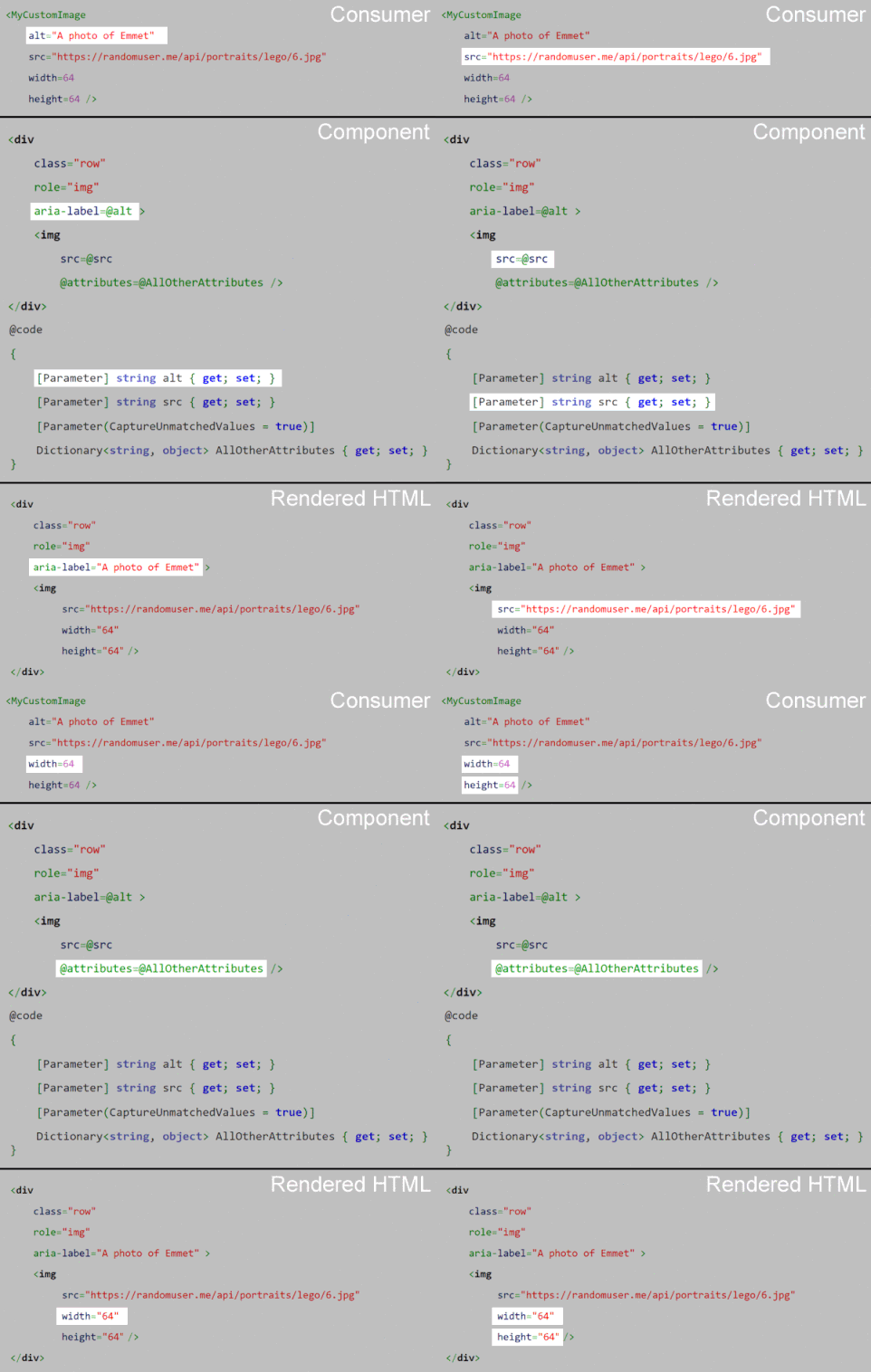
Capturing values of attributes without matching parameters works in a similar way.
We simply create a property of type `Dictionary`, decorate it as being a `[Parameter]`,
but in the Parameter we need to specify `CaptureUnmatchedValues = true`.
```razor
@code
{
[Parameter]
public string? Src { get; set; }
[Parameter]
public string? Alt { get; set; }
[Parameter(CaptureUnmatchedValues = true)]
public Dictionary? AllOtherAttributes { get; set; }
}
```
Now instead of throwing an exception when the consumer of your component adds attribute values you have not explicitly
permitted with a `[Parameter]` decorated property (the normal behavior), Blazor will collect them into the dictionary
for us as Key/Value pairs.
The dictionary type can be `Dictionary`, `IDictionary`, or `IReadOnlyDictionary`. Only one property with `CaptureUnmatchedValues = true` is allowed per component; if more than one exists, Blazor will throw an exception.
In the preceding example, any `attributes=value` assignments specified by the consumer of our component will be added to
the `` element within our component.
```razor
```
For more on how captured attributes interact with component-defined default values, see [Replacing attributes on child components](/components/replacing-attributes-on-child-components/).
Hire [Peter Morris](mailto:mrpmorris@gmail.com) for Blazor and C# work - author of Blazor-University.com, the definitive source for Blazor.