[](https://github.com/mrpmorris/blazor-university/tree/master/src/Components/CreatingAComponent)
In the Client app create a new folder named **Components**.
This is not a special name, we can choose any name we wish.
Once you've created the new **Components** folder,
create a file within it named **MyFirstComponent.razor** and enter the following mark-up.
```razor
This is my first component
```
Now edit the **Index.razor** file.
At this point we can either reference the component with a fully qualified name:
```razor
```
Or edit **/_Imports.razor** and add `@using MyFirstBlazorApp.Client.Components`.
The using statements here are cascaded into all Razor views -
which means the mark-up to use the new component in **/Pages/Index.razor** no longer needs a namespace.
```razor
@page "/"
Hello, world!
Welcome to your new app.
```
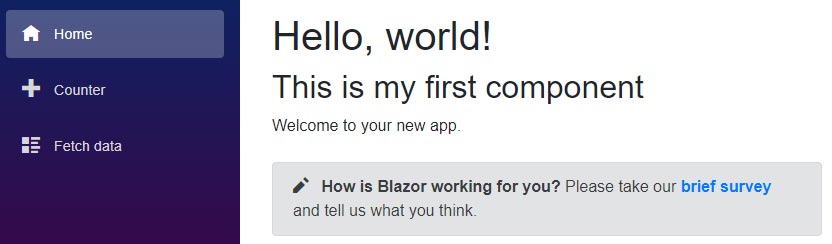
Now run the app and we'll see the following.
Hire [Peter Morris](mailto:mrpmorris@gmail.com) for Blazor and C# work - author of Blazor-University.com, the definitive source for Blazor.