By default, rendered Blazor views descend from the `ComponentBase` class, this includes Layouts, Pages, and also Components.
A Blazor page is essentially a component with a `@page` directive that specifies the URL the browser must navigate to in
order for it to be rendered.
In fact, if we compare the generated code for a component and a page there is very little difference.
The following generated source code can be found in
```
obj\Debug\{DotNetVersion}\generated\Microsoft.CodeAnalysis.Razor.Compiler\Microsoft.NET.Sdk.Razor.SourceGenerators.RazorSourceGenerator\Components\Pages\Counter_razor.g.cs
```
where the path after `Microsoft.NET.Sdk.Razor.SourceGenerators.RazorSourceGenerator` matches the folder layout in your project.
Note that after Blazor version 3 these files are no longer automatically written to disk.
To re-enable this feature, edit your `csproj` file and add the following:
```xml
true
```
```cs
namespace MyFirstBlazorApp.Client.Pages
{
[Microsoft.AspNetCore.Components.RouteAttribute("/counter")]
public class Counter : Microsoft.AspNetCore.Components.ComponentBase
{
protected override void BuildRenderTree(Microsoft.AspNetCore.Components.RenderTree.RenderTreeBuilder builder)
{
// Code omitted for brevity
}
private int currentCount = 42;
private void IncrementCount()
{
currentCount++;
}
}
}
```
`[Microsoft.AspNetCore.Components.RouteAttribute("/counter")]` identifies the URL for the page.
In fact, because pages are merely components decorated with additional attributes, if you alter the **Home.razor** file in **Components/Pages/** of a default Blazor app, it is possible to embed the **Counter** page as a component.
```razor
@page "/"
Hello, world!
Welcome to your new app.
```
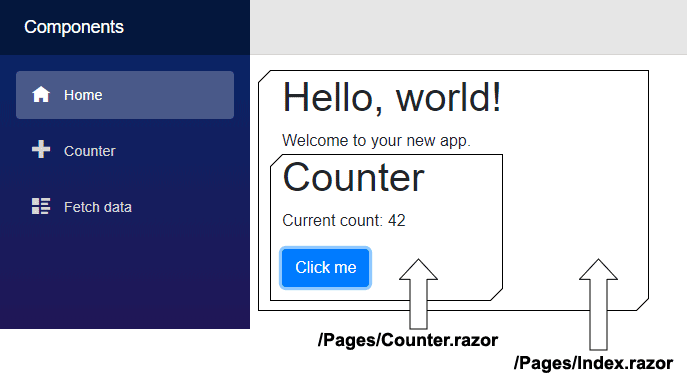
When embedding a page within another page, Blazor treats it as a component.
## Render modes
In Blazor .NET 8 and later, components render as Static Server-Side Rendering (Static SSR) by default. This means the embedded Counter component would not be interactive unless we specify an interactive render mode. We can apply a render mode using the `@rendermode` directive:
```razor
```
Render modes are covered in more detail in the [Directives](literals-expressions-and-directives/directives) section.
If you have added an explicit [Layout](../layouts/) you will also see the attribute `[Microsoft.AspNetCore.Components.LayoutAttribute(typeof(MainLayout))]`, which identifies which layout to use.
When a page is embedded within another page like this, the `LayoutAttribute` on the embedded page is ignored because Blazor already has an explicit container, the parent component that contains it.
To learn how to build your own reusable components, see [Creating a component](creating-a-component).
Hire [Peter Morris](mailto:mrpmorris@gmail.com) for Blazor and C# work - author of Blazor-University.com, the definitive source for Blazor.