[](https://github.com/mrpmorris/blazor-university/tree/master/src/Forms/ValidatingUserInput)
The `DataAnnotationsValidator` is the standard validator type in Blazor.
Adding this component within an `EditForm` component will enable form validation based on .NET attributes descended
from `System.ComponentModel.DataAnnotations.ValidationAttribute`.
First we'll create a short example, then we'll go through what happens behind the scenes.
First, create a model we can edit, and decorate its properties with some data annotations for validation.
```razor {: .line-numbers}
public class Person
{
[Required]
public string Name { get; set; }
[Range(18, 80, ErrorMessage = "Age must be between 18 and 80.")]
public int Age { get; set; }
}
```
- Line 3 specifies the `Name` property cannot be null or empty.
- Line 5 specifies a valid range of values for the `Age` property (from 18 to 80) and
also provides a suitable error message to display to the user.
With nullable reference types enabled, the compiler gives a warning if a non-nullable `string` property like `Name` is left uninitialized. The `[Required]` attribute adds runtime validation on top of that compile-time safety, ensuring the user provides a value even when the property has been initialized in code.
## Adding validation
Edit the **Index.razor** page in a default Blazor app and provide some mark-up to edit an instance of `Person`.
```razor
@code {
Person Person = new Person();
}
```
Running the app now will result in the user being presented with a form that does not validate their input.
To ensure the form is validated we must specify a validation mechanism.
Add a `DataAnnotationsValidator` component inside the `EditForm` component.
```razor
```
Running the app and clicking the **Save** button will update the user interface to provide a visual indication that there
are errors in the user's input.
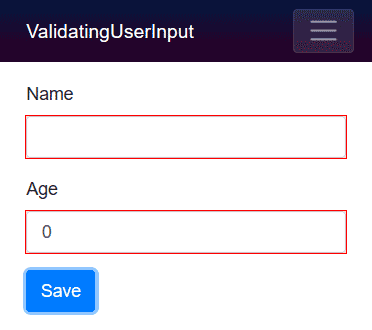
When an input is validated, Blazor applies CSS classes to indicate its state. The `modified` class is added once the user has interacted with the field, `valid` when the value passes validation, and `invalid` when it does not. We can use these classes to style our inputs accordingly.
## Displaying validation error messages
Validation error messages can be displayed to the user in two ways.
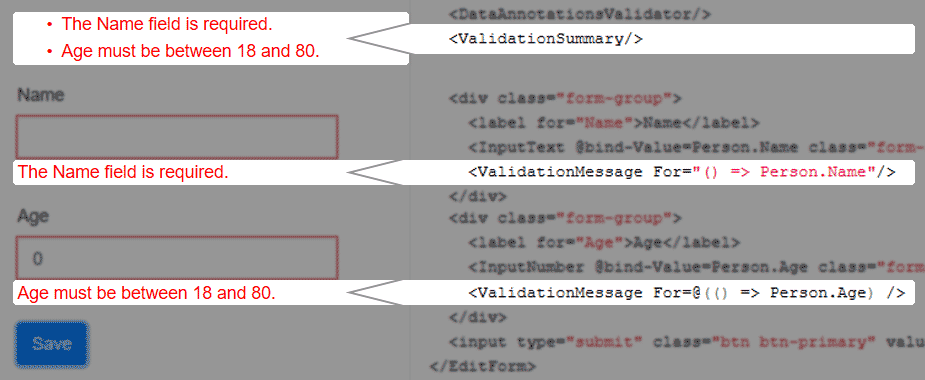
We can add a `ValidationSummary` to show a comprehensive list of all errors in the form.
We can also use the `ValidationMessage` component to display error messages for a specific input on the form.
These components are not mutually exclusive, so it is possible to use both at the same time.
The `ValidationSummary` component can simply be dropped into an `EditForm` in our mark-up;
no additional parameters are required at all.
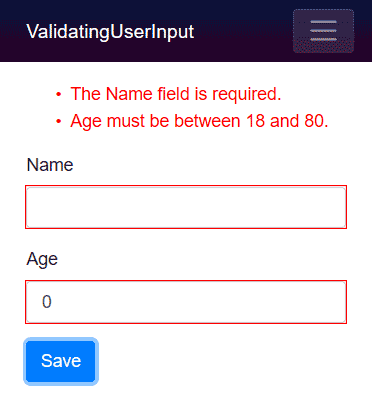
As the `ValidationMessage` component displays error messages for a single field,
it requires us to specify the identity of the field.
To ensure our parameter's value stays correct after refactoring
(for example, when we refactor property names on our `Person` class)
Blazor requires us to specify an `Expression` when identifying the field.
The `ValidationMessage` component defines a `[Parameter]` named `For` with the following signature (this is Blazor's own definition, not code we need to write ourselves):
```cs
[Parameter]
public Expression> For { get; set; }
```
This means to specify the identity of the field we should use a lambda expression, which can be presented either "quoted",
or wrapped in `@(...)`
- Quoted form
``
- Razor expression form
` Person.Name )/>`
Both forms are equivalent. The quoted form is easier to read,
whereas the razor expression makes it more obvious to other developers that we are defining an expression rather than a string.
```razor
@page "/"
@using Models
Person.Age) />
@code {
Person Person = new Person();
}
```
## Registering validation services
In .NET 10, Blazor introduced a new validation registration system. Instead of placing a `DataAnnotationsValidator` component inside every `EditForm`, we can register a validation service globally using `builder.Services.AddValidation()`. This service automatically validates complex object graphs and is the recommended approach for new applications.
To enable this, first register the service in **Program.cs**:
```cs
builder.Services.AddValidation();
```
Then annotate the model types we want to validate with the `[ValidatableType]` attribute:
```cs
[ValidatableType]
public class Person
{
[Required]
public string Name { get; set; }
[Range(18, 80)]
public int Age { get; set; }
}
```
When `AddValidation` is registered, we no longer need to include `` inside each `EditForm`. The service validates the entire object graph automatically, including nested complex-type properties. This replaces the earlier experimental `ObjectGraphDataAnnotationsValidator` component, which is now deprecated.
[](images/ValidationSummaryAndValidationMessages.png)
Hire [Peter Morris](mailto:mrpmorris@gmail.com) for Blazor and C# work - author of Blazor-University.com, the definitive source for Blazor.