During the Blazor boot process, the browser will create the HTML document before Blazor is initialized,
this means any JavaScript referenced from the bootstrap HTML will be loaded immediately,
and any code that executes automatically within those JavaScript files will be executed before
Blazor has had a chance to initialize.
[](https://github.com/mrpmorris/blazor-university/tree/master/src/JavaScriptInterop/JavaScriptBootProcess)
To observe this, create a new Blazor server-side application:
- Edit **/App.razor**
- Add the following `OnInitialized` method.
```razor
@code {
protected override void OnInitialized()
{
System.Diagnostics.Debug.WriteLine("Blazor initialized: " + DateTime.Now.ToString("mm:ss.fff"));
base.OnInitialized();
}
}
```
- Create a folder under the **/wwwroot** folder named **scripts**
- Within that folder create a file named **JavaScriptBootProcess.js**
- Add the following script
```js
const now = new Date();
console.log('JavaScript initialized: ' + now.getMinutes() + ":" + now.getSeconds() + "." + now.getMilliseconds());
```
- Edit **/App.razor** (or **/Components/App.razor** depending on the template)
- Ensure the script reference points to `blazor.web.js` (the unified script in .NET 8+)
- Add a reference to our new script after the Blazor script tag
```html
```
Run the application and look in both the browser's console output and Visual Studio's output window.
Comparing the output, we will see something like the following:
```console
JavaScript initialized: 15:20.317
Blazor initialized: 15:20.466
```
Because of this behavior it is not possible for JavaScript to invoke .NET methods immediately.
When using JavaScript interop, I advise initiating the communication from the Blazor side if possible.
## Static server-side rendering and prerendering
In .NET 8 and later, Blazor supports static server-side rendering (static SSR) where components render to HTML on the server without any interactive Blazor circuit. During static SSR, there is no JavaScript runtime available at all. When using an interactive render mode such as Interactive Server or Interactive WebAssembly, the server prerenders the component to HTML before the Blazor runtime initializes on the client.
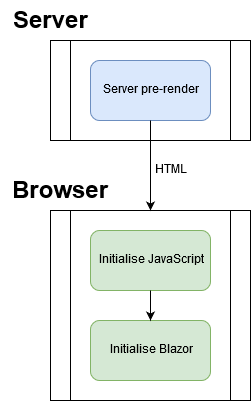
If we use an interactive render mode with prerendering enabled (the default), we will see the following sequence:
```
Blazor initialized (prerender): 42:22.559
JavaScript initialized: 42:22.631
Blazor initialized (interactive): 42:22.690
```
The first time the user visits a URL to our app, Blazor will render the App.razor component on the server (or as static HTML) and send the resulting HTML to the browser. After that, JavaScript is initialized, and then finally Blazor is initialized for the client to interact with.
To disable prerendering for an interactive render mode, we can set `prerender: false` on the render mode:
```razor
@rendermode new InteractiveServerRenderMode(prerender: false)
```
The core lesson is that JavaScript interop is not available during static SSR or prerendering. Any attempt to call `IJSRuntime` during these phases will throw an `InvalidOperationException`. We must always guard JS interop calls behind `OnAfterRenderAsync` and the `firstRender` parameter.
## JavaScript initializers
In .NET 8 and later, Blazor supports JavaScript initializers: files named `{LibraryName}.lib.module.js` that are automatically loaded before the Blazor runtime starts. These are useful for libraries that need to run setup code before any Blazor component is rendered. Unlike regular scripts, JavaScript initializers can export functions that Blazor calls at specific points in the boot lifecycle (before start, after start, etc.).
Hire [Peter Morris](mailto:mrpmorris@gmail.com) for Blazor and C# work - author of Blazor-University.com, the definitive source for Blazor.